IN GATE · VISITOR MANAGEMENT
Connecting every step of the visitor journey.
A visitor management system connecting hosts, security, administrators, and visitors through one connected workflow.

Duration
12 Weeks
Role
UI/UX Designer
Platform
Mobile,
Desktop
Tablet
Discipline
Research · Design · Prototype
About the Project
InGate is a visitor management platform designed to simplify visitor registration, approvals, and access control across residential communities, offices, and commercial properties.
The platform connects hosts, security personnel, administrators, and visitors through a unified system, reducing manual effort while improving visibility and security.
Understanding the Ecosystem
Before designing the solution, I mapped the people involved in the visitor management process.
🏠 Host
Creates and approves visitor requests.
⚙️ Admin
Manages users, permissions, and reports.
🛡️ Security
Verifies visitors and manages entry/exit.
🎫 Visitor
Receives a digital pass for seamless access.
Key Observation
The visitor management process involves multiple stakeholders with different goals and responsibilities. Any delay or communication gap between them directly impacts security and visitor experience.
Challenges Across Stakeholders
After understanding the ecosystem, I identified the major challenges faced by each stakeholder.
Host Challenges
• No visitor tracking
• Communication gaps between host and visitor
• Unauthorised access concerns
• No real-time updates
• Time-consuming approval process
Administrator Challenges
• Lack of reporting
• Limited operational visibility
• Difficulty tracking visitor activity
Security Personnel Challenges
• Manual check-in process
• No visitor record tracking
• Verification delays
• Difficult visitor monitoring
• Risk of human errors during peak hours
Visitor Challenges
• No pre-registration process
• Long waiting times
• Delayed approvals
• Poor entry experience
Key Observation
Most problems were caused by disconnected workflows and a lack of visibility between stakeholders.
Research & Key Insights
To understand the challenges in visitor management, I analyzed existing processes and stakeholder needs. The goal was to identify gaps that affected security, efficiency, and visitor experience.
Research Findings
After analyzing stakeholder challenges, four recurring themes emerged across the visitor management process.
Finding
Visitor approvals take too long
Security relies on manual logs
Hosts are not informed in real-time
Visitor data is difficult to track
Impact
Delays at entry
Error-prone records
Communication gaps
Poor visibility
Needs vs Wants
Needs
Fast visitor approval
Secure verification
Accurate records
Easy visitor tracking
Wants
Digital visitor passes
Real-time notifications
QR-based entry
Visitor history
Opportunity
Create a unified visitor management platform that simplifies approvals, improves security, and reduces manual effort.
Designing The System
Before designing the final experience, I explored different approaches to simplify visitor registration, approvals, and entry management across multiple stakeholders.
Exploration
Mapped workflows and screen ideas through quick sketches and whiteboard sessions

⇣
Wireframing
Defined layout structure, form hierarchy, and visitor registration flow

⇣
Final Outcome
Refined the experience into a complete and user-friendly registration system

Outcome
Once the registration is completed, a unique QR-based access pass is generated for the visitor. The pass can be shared using the visitor's contact information and later verified by security personnel during entry.
Design Principles
Reduce the number of steps required for visitor registration and approvals.
Visibility
Provide real-time status updates and visitor tracking.
Security
Enable controlled access through digital passes and verification.
Product Architecture
InGate connects hosts, visitors, security personnel, and administrators through a centralized platform that streamlines visitor approvals, verification, and access management.

Key Insight
Instead of managing visitors through calls, registers, and manual approvals, InGate centralises the entire process into a single connected system used by hosts, visitors, security personnel, and administrators.
Visitor Access Flow

Host Experience
The host is responsible for creating visitor requests, approving access, and tracking visitor activity.
InGate helps hosts complete these tasks through a simple mobile experience.
Key Responsibilities
Create Visitors
Register guests, delivery personnel, or service staff
Approve Access
Review and approve visitor requests before arrival
Track Activity
Monitor visitor history and entry records

Home/Dashboard
Provides a quick overview of visitors,
pending approvals, and recent activity.

Visitor Log
A centralized list for tracking active,
upcoming, and completed visits.
Visitor Registration
Hosts can register visitors by
entering basic details and visit information.
Visitor Details
Displays visitor information, visit history, and QR access pass.

Security Experience
Security personnel verify visitors, monitor access, and maintain entry records.
Key Responsibilities
Verify QR Passes
Confirm visitor authenticity
Monitor Entry & Exit
Track visitor movement
Maintain Security Logs
Keep accurate records
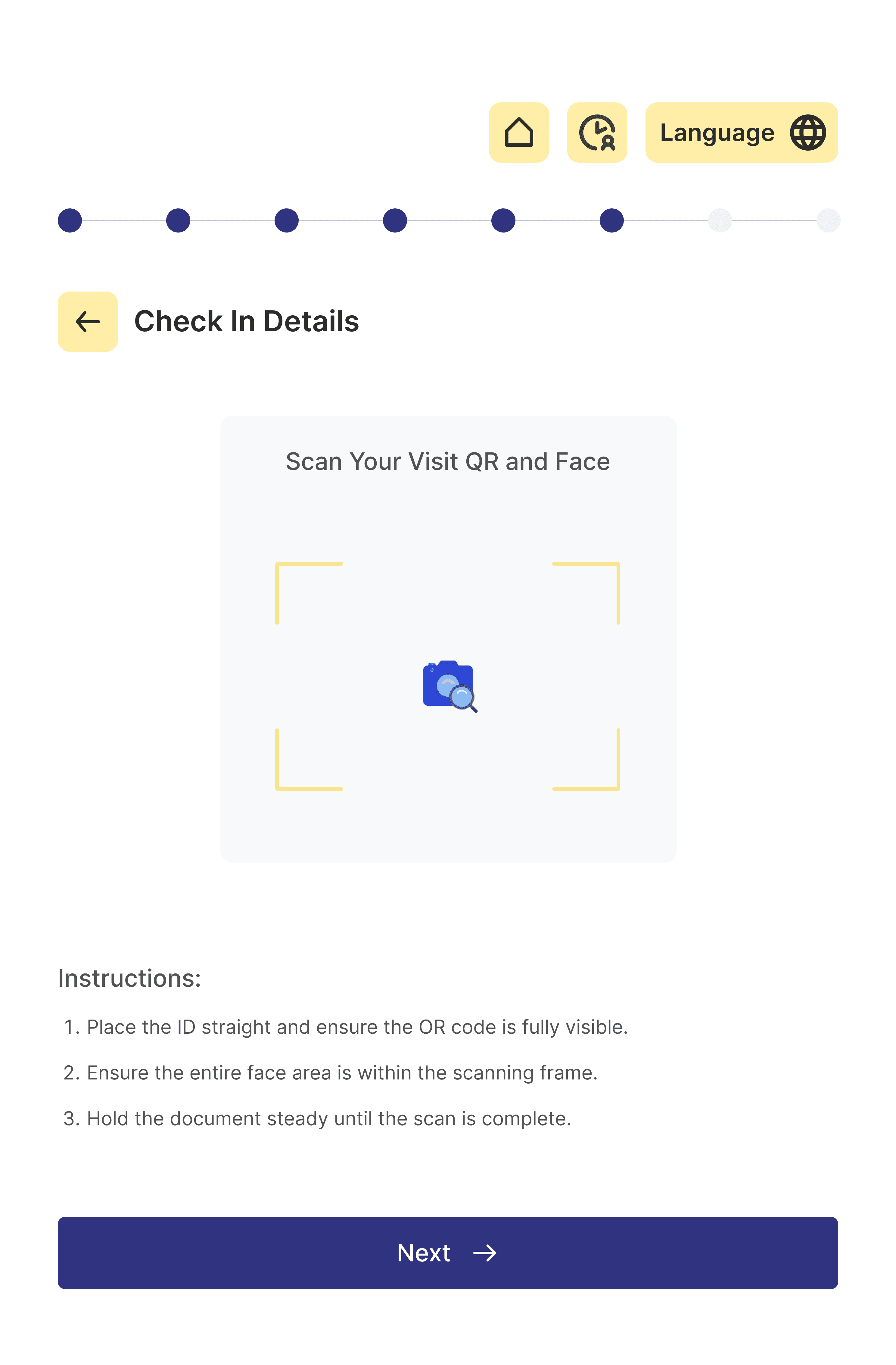
Visitor Verification
Scan and validate QR codes
Visitor Details
View visitor information before granting access


Check-In / Check-Out
Record entry and exit activity
Admin Experience
Administrators oversee the entire visitor management system through a centralized dashboard.
Key Responsibilities
Manage Users
Control access and permissions
Monitor Records
View visitor activity and
logs
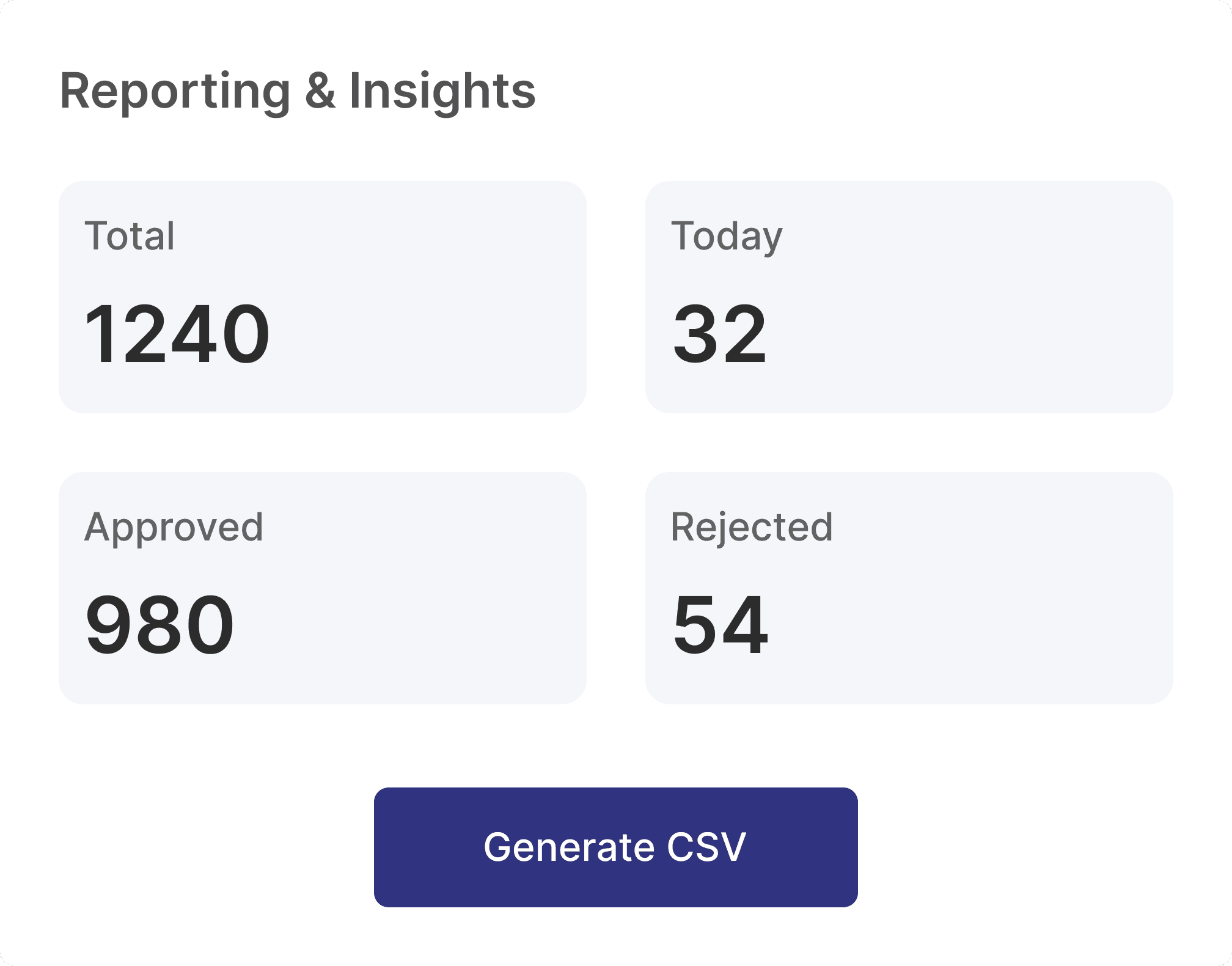
Generate Reports
Track trends and operational insights
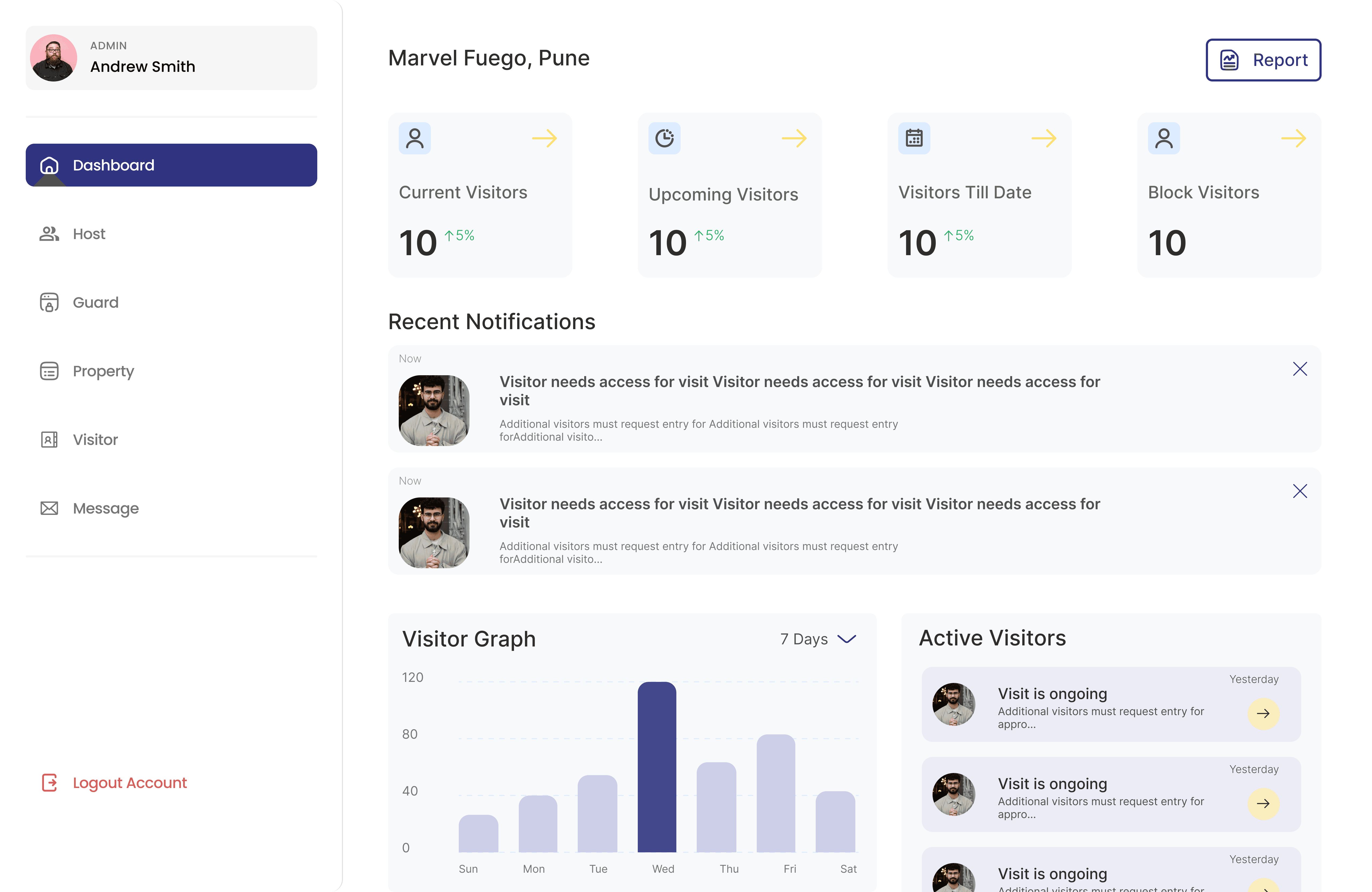
Dashboard
System-wide overview
User Management
Manage hosts and security personnel


Visitor Records
Monitor visitor data
Reports
Generate operational reports
Expected Outcome
The designed workflow was intended to reduce manual steps, make approvals easier to track, and give security teams clearer visitor information at the point of entry
LESS MANUAL WORK
Registration → digital workflow
BETTER VISIBILITY
Visitor status → real-time tracking
FASTER VERIFICATION
Visitor pass → QR-based check-in
InGate — Reflection
What I learned - Designing for multiple stakeholders means solving the system, not just the screen
01
Convenience and security often pull in different directions
02
A good workflow can remove more friction than a polished interface.
03
Every stakeholder needs visibility into the part of the system that affects them